VPC Egress Gateway
Note
Subnets under custom VPCs do not support distributed gateways and centralized gateways under default VPCs.
Currently, custom VPCs support three solutions for external network connectivity: VPC NAT Gateway, OVN Gateway, and Egress Gateway. Among them, VPC NAT Gateway is the earliest supported egress method by Kube-OVN, creating a multi-NIC Pod for each VPC NAT Gateway, with one NIC connected to the custom VPC network and another NIC connected to the underlying physical network through Macvlan, implementing various ingress/egress operations through iptables within the Pod. This method currently supports the most features and has been used for the longest time, but it also has the disadvantages of single point of failure and complex usage.
OVN Gateway uses various NAT capabilities natively supported within OVN to implement ingress/egress, which can improve performance through hardware acceleration and achieve failover through OVN's built-in BFD. Since it exposes OVN's native concepts, users need to be fairly familiar with OVN's application.
Egress Gateway is an improvement to address the single point issue of VPC NAT Gateway, implementing horizontal scaling and fast failover, but currently only implements egress capability without ingress capability.
VPC Egress Gateway is used to control external network access for Pods within a VPC (including the default VPC) with a group of static addresses and has the following features:
- Achieves Active-Active high availability through ECMP, enabling horizontal throughput scaling
- Implements fast failover (<1s) via BFD
- Supports IPv6 and dual-stack
- Enables granular routing control through
NamespaceSelectorandPodSelector - Allows flexible scheduling of Egress Gateway through
NodeSelector
VPC Egress Gateway also supports establishing dynamic routing with external networks through BGP and EVPN/VXLAN. For details, refer to Egress Gateway BGP/EVPN Support.
For interface metrics, conntrack NAT metrics, and JSON flow logs, refer to VPC Egress Gateway Observability.
At the same time, VPC Egress Gateway has the following limitations:
- Uses macvlan for underlying network connectivity, requiring Underlay support from the underlying network
- In multi-instance Gateway mode, multiple Egress IPs are required
- Currently, only supports SNAT; EIP and DNAT are not supported
- Currently, recording source address translation relationships is not supported
Implementation Details
Each Egress Gateway consists of multiple Pods with multiple network interfaces. Each Pod has two network interfaces: one joins the virtual network for communication within the VPC, and the other connects to the underlying physical network via Macvlan for external network communication. Virtual network traffic ultimately accesses the external network through NAT within the Egress Gateway instances.
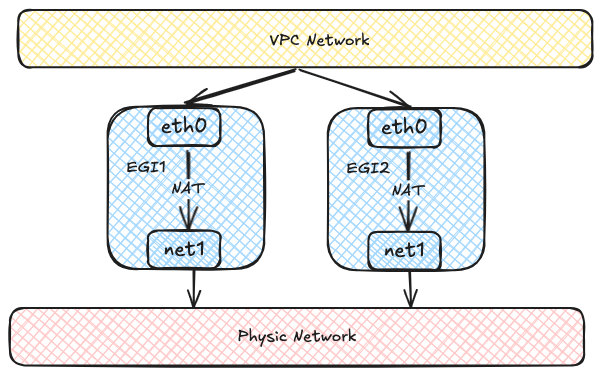
Each Egress Gateway instance registers its address in the OVN routing table. When a Pod within the VPC needs to access the external network, OVN uses source address hashing to forward traffic to multiple Egress Gateway instance addresses, achieving load balancing. As the number of Egress Gateway instances increases, throughput can also scale horizontally.
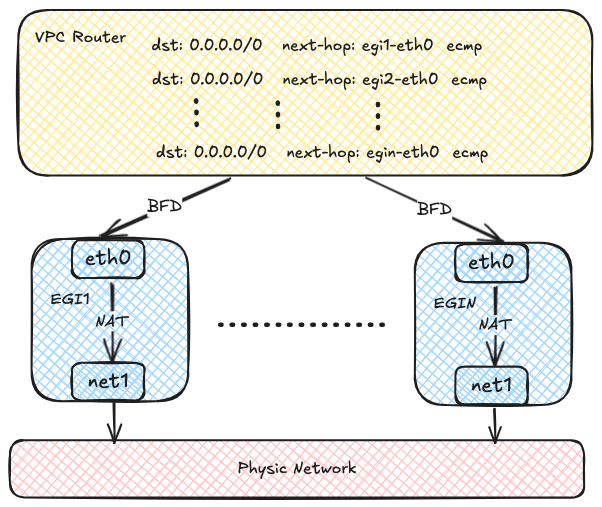
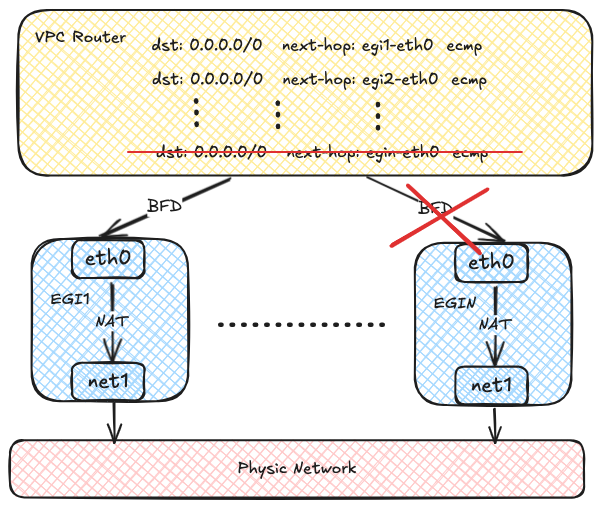
OVN uses the BFD protocol to probe multiple Egress Gateway instances. When an Egress Gateway instance fails, OVN marks the corresponding route as unavailable, enabling rapid failure detection and recovery.
Requirements
The VPC Egress Gateway is the same as the VPC NAT Gateway in that it requires Multus-CNI.
No ConfigMap needs to be configured to use VPC Egress Gateway.
When Kube-OVN runs in non-primary CNI mode, configure the internal subnet as a Kube-OVN network provided by a NetworkAttachmentDefinition. The internal subnet provider must use the format <nad-name>.<nad-namespace>.ovn, and the referenced NetworkAttachmentDefinition must already exist. For example:
apiVersion: k8s.cni.cncf.io/v1
kind: NetworkAttachmentDefinition
metadata:
  name: veg-internal
  namespace: default
spec:
  config: |
    {
      "cniVersion": "0.3.1",
      "type": "kube-ovn",
      "server_socket": "/run/openvswitch/kube-ovn-daemon.sock",
      "provider": "veg-internal.default.ovn"
    }
---
apiVersion: kubeovn.io/v1
kind: Subnet
metadata:
  name: veg-internal-subnet
spec:
  vpc: vpc1
  provider: veg-internal.default.ovn
  protocol: IPv4
  cidrBlock: 192.168.0.0/24
  gateway: 192.168.0.1
Reference this subnet with internalSubnet in the VPC Egress Gateway. In this special case, Multus uses the internal NetworkAttachmentDefinition as the Pod's default network, so the gateway Pod's internal tenant network is eth0; the external NetworkAttachmentDefinition referenced by externalSubnet is attached as net1 and provides the default route. The usual primary-CNI eth0 layout does not apply to this gateway Pod. Use policies to select traffic sources in this mode; selectors are not supported when non-primary CNI mode is enabled. If the provider format is invalid or the NetworkAttachmentDefinition is missing, the gateway workload cannot be reconciled.
Usage
Creating a Network Attachment Definition
The VPC Egress Gateway uses multiple NICs to access both the VPC and the external network, so you need to create a Network Attachment Definition to connect to the external network. An example of using the macvlan plugin with IPAM provided by Kube-OVN is shown below:
apiVersion: k8s.cni.cncf.io/v1
kind: NetworkAttachmentDefinition
metadata:
  name: eth1
  namespace: default
spec:
  config: '{
      "cniVersion": "0.3.0",
      "type": "macvlan",
      "master": "eth1",
      "mode": "bridge",
      "ipam": {
        "type": "kube-ovn",
        "server_socket": "/run/openvswitch/kube-ovn-daemon.sock",
        "provider": "eth1.default"
      }
    }'
---
apiVersion: kubeovn.io/v1
kind: Subnet
metadata:
  name: macvlan1
spec:
  protocol: IPv4
  provider: eth1.default
  cidrBlock: 172.17.0.0/16
  gateway: 172.17.0.1
  excludeIps:
    - 172.17.0.0..172.17.0.10
You can create a Network Attachment Definition with any CNI plugin to access the corresponding network.
For details on how to use multi-nic, please refer to Manage Multiple Interface.
Creating a VPC Egress Gateway
Create a VPC Egress Gateway resource as shown in the example below:
apiVersion: kubeovn.io/v1
kind: VpcEgressGateway
metadata:
  name: gateway1
  namespace: default
spec:
  vpc: ovn-cluster
  replicas: 1
  externalSubnet: macvlan1
  policies:
    - snat: true
      subnets:
        - ovn-default
The above resource creates a VPC Egress Gateway named gateway1 for VPC ovn-cluster under the default namespace, and all Pods under the ovn-default subnet (10.16.0.0/16) within ovn-cluster VPC will access the external network via the macvlan1 subnet with SNAT applied.
For the non-primary CNI example above, create the gateway with the internal subnet explicitly selected and use a policy instead of selectors:
apiVersion: kubeovn.io/v1
kind: VpcEgressGateway
metadata:
  name: gateway-nonprimary
  namespace: default
spec:
  vpc: vpc1
  replicas: 1
  internalSubnet: veg-internal-subnet
  externalSubnet: macvlan1
  policies:
    - snat: true
      subnets:
        - veg-internal-subnet
After the creation is complete, check out the VPC Egress Gateway resource:
$ kubectl get veg gateway1
NAME       VPC           REPLICAS   BFD ENABLED   EXTERNAL SUBNET   PHASE       READY   AGE
gateway1   ovn-cluster   1          false         macvlan1          Completed   true    13s
To view more informations:
kubectl get veg gateway1 -o wide
NAME       VPC           REPLICAS   BFD ENABLED   EXTERNAL SUBNET   PHASE       READY   INTERNAL IPS     EXTERNAL IPS      WORKING NODES         AGE
gateway1   ovn-cluster   1          false         macvlan1          Completed   true    ["10.16.0.12"]   ["172.17.0.11"]   ["kube-ovn-worker"]   82s
To view the workload:
$ kubectl get deployment -l ovn.kubernetes.io/vpc-egress-gateway=gateway1
NAME       READY   UP-TO-DATE   AVAILABLE   AGE
gateway1   1/1     1            1           4m40s

$ kubectl get pod -l ovn.kubernetes.io/vpc-egress-gateway=gateway1 -o wide
NAME                       READY   STATUS    RESTARTS   AGE     IP           NODE              NOMINATED NODE   READINESS GATES
gateway1-b9f8b4448-76lhm   1/1     Running   0          4m48s   10.16.0.12   kube-ovn-worker   <none>           <none>
To view IP addresses, routes, and iptables rules in the Pod:
$ kubectl exec gateway1-b9f8b4448-76lhm -c gateway -- ip address show
1: lo: <LOOPBACK,UP,LOWER_UP> mtu 65536 qdisc noqueue state UNKNOWN group default qlen 1000
    link/loopback 00:00:00:00:00:00 brd 00:00:00:00:00:00
    inet 127.0.0.1/8 scope host lo
       valid_lft forever preferred_lft forever
    inet6 ::1/128 scope host
       valid_lft forever preferred_lft forever
2: net1@if13: <BROADCAST,MULTICAST,UP,LOWER_UP> mtu 1500 qdisc noqueue state UP group default qlen 1000
    link/ether 62:d8:71:90:7b:86 brd ff:ff:ff:ff:ff:ff link-netnsid 0
    inet 172.17.0.11/16 brd 172.17.255.255 scope global net1
       valid_lft forever preferred_lft forever
    inet6 fe80::60d8:71ff:fe90:7b86/64 scope link
       valid_lft forever preferred_lft forever
17: eth0@if18: <BROADCAST,MULTICAST,UP,LOWER_UP> mtu 1400 qdisc noqueue state UP group default
    link/ether 36:7c:6b:c7:82:6b brd ff:ff:ff:ff:ff:ff link-netnsid 0
    inet 10.16.0.12/16 brd 10.16.255.255 scope global eth0
       valid_lft forever preferred_lft forever
    inet6 fe80::347c:6bff:fec7:826b/64 scope link
       valid_lft forever preferred_lft forever

$ kubectl exec gateway1-b9f8b4448-76lhm -c gateway -- ip route show
default via 172.17.0.1 dev net1
10.16.0.0/16 dev eth0 proto kernel scope link src 10.16.0.12
172.17.0.0/16 dev net1 proto kernel scope link src 172.17.0.11

$ kubectl exec gateway1-b9f8b4448-76lhm -c gateway -- iptables -t nat -S
-P PREROUTING ACCEPT
-P INPUT ACCEPT
-P OUTPUT ACCEPT
-P POSTROUTING ACCEPT
-A POSTROUTING -s 10.16.0.0/16 -j MASQUERADE --random-fully
Capture packets in the Gateway Pod to verify network traffic:
$ kubectl exec -ti gateway1-b9f8b4448-76lhm -c gateway -- bash
nobody@gateway1-b9f8b4448-76lhm:/kube-ovn$ tcpdump -i any -nnve icmp and host 172.17.0.1
tcpdump: data link type LINUX_SLL2
tcpdump: listening on any, link-type LINUX_SLL2 (Linux cooked v2), snapshot length 262144 bytes
06:50:58.936528 eth0  In  ifindex 17 92:26:b8:9e:f2:1c ethertype IPv4 (0x0800), length 104: (tos 0x0, ttl 63, id 30481, offset 0, flags [DF], proto ICMP (1), length 84)
    10.16.0.9 > 172.17.0.1: ICMP echo request, id 37989, seq 0, length 64
06:50:58.936574 net1  Out ifindex 2 62:d8:71:90:7b:86 ethertype IPv4 (0x0800), length 104: (tos 0x0, ttl 62, id 30481, offset 0, flags [DF], proto ICMP (1), length 84)
    172.17.0.11 > 172.17.0.1: ICMP echo request, id 39449, seq 0, length 64
06:50:58.936613 net1  In  ifindex 2 02:42:39:79:7f:08 ethertype IPv4 (0x0800), length 104: (tos 0x0, ttl 64, id 26701, offset 0, flags [none], proto ICMP (1), length 84)
    172.17.0.1 > 172.17.0.11: ICMP echo reply, id 39449, seq 0, length 64
06:50:58.936621 eth0  Out ifindex 17 36:7c:6b:c7:82:6b ethertype IPv4 (0x0800), length 104: (tos 0x0, ttl 63, id 26701, offset 0, flags [none], proto ICMP (1), length 84)
    172.17.0.1 > 10.16.0.9: ICMP echo reply, id 37989, seq 0, length 64
Routing policies are automatically created on the OVN Logical Router:
$ kubectl ko nbctl lr-policy-list ovn-cluster
Routing Policies
     31000                            ip4.dst == 10.16.0.0/16           allow
     31000                           ip4.dst == 100.64.0.0/16           allow
     30000                              ip4.dst == 172.18.0.2         reroute                100.64.0.3
     30000                              ip4.dst == 172.18.0.3         reroute                100.64.0.2
     30000                              ip4.dst == 172.18.0.4         reroute                100.64.0.4
     29100                            ip4.src == 10.16.0.0/16         reroute                10.16.0.12
     29000 ip4.src == $ovn.default.kube.ovn.control.plane_ip4         reroute                100.64.0.2
     29000       ip4.src == $ovn.default.kube.ovn.worker2_ip4         reroute                100.64.0.4
     29000        ip4.src == $ovn.default.kube.ovn.worker_ip4         reroute                100.64.0.3
If you need to enable load balancing, modify .spec.replicas as shown in the following example:
$ kubectl scale veg gateway1 --replicas=2
vpcegressgateway.kubeovn.io/gateway1 scaled

$ kubectl get veg gateway1
NAME       VPC           REPLICAS   BFD ENABLED   EXTERNAL SUBNET   PHASE       READY   AGE
gateway1   ovn-cluster   2          false         macvlan           Completed   true    39m

$ kubectl get pod -l ovn.kubernetes.io/vpc-egress-gateway=gateway1 -o wide
NAME                       READY   STATUS    RESTARTS   AGE   IP           NODE               NOMINATED NODE   READINESS GATES
gateway1-b9f8b4448-76lhm   1/1     Running   0          40m   10.16.0.12   kube-ovn-worker    <none>           <none>
gateway1-b9f8b4448-zd4dl   1/1     Running   0          64s   10.16.0.13   kube-ovn-worker2   <none>           <none>

$ kubectl ko nbctl lr-policy-list ovn-cluster
Routing Policies
     31000                            ip4.dst == 10.16.0.0/16           allow
     31000                           ip4.dst == 100.64.0.0/16           allow
     30000                              ip4.dst == 172.18.0.2         reroute                100.64.0.3
     30000                              ip4.dst == 172.18.0.3         reroute                100.64.0.2
     30000                              ip4.dst == 172.18.0.4         reroute                100.64.0.4
     29100                            ip4.src == 10.16.0.0/16         reroute                10.16.0.12, 10.16.0.13
     29000 ip4.src == $ovn.default.kube.ovn.control.plane_ip4         reroute                100.64.0.2
     29000       ip4.src == $ovn.default.kube.ovn.worker2_ip4         reroute                100.64.0.4
     29000        ip4.src == $ovn.default.kube.ovn.worker_ip4         reroute                100.64.0.3
Using PrimaryCNI Mode
In a non-primary CNI deployment where nodes do not have a shared Layer 2 underlay, set the external network mode to PrimaryCNI. This mode requires Kube-OVN v1.17 or later and non-primary CNI mode to be enabled (cni_conf.NON_PRIMARY_CNI=true for chart v1 or cni.nonPrimaryCNI=true for chart v2). It uses the Pod's primary eth0 interface for the external network and connects the internal Kube-OVN network through a Multus attachment. The internal attachment must use a NetworkAttachmentDefinition and its corresponding Kube-OVN subnet; it carries VPC traffic without replacing the primary CNI network.
apiVersion: kubeovn.io/v1
kind: VpcEgressGateway
metadata:
  name: gateway-primary-cni
  namespace: default
spec:
  vpc: ovn-cluster
  replicas: 1
  externalNetworkMode: PrimaryCNI
  internalSubnet: gateway-internal
  policies:
    - subnets:
        - workload-subnet
      snat: true
PrimaryCNI mode preserves the primary CNI's default route and existing NAT and raw table rules. OVN uses the internal attachment IP as the reroute next hop and reports it in status.internalIPs; the primary CNI Pod IP is used as the external address and reported in status.externalIPs. IPv4 SNAT or IPv6 NAT66 applies only to traffic entering through the internal attachment and leaving through eth0.
When snat is set to false in a policy, the external network must have a route that returns traffic to the VPC prefix. PrimaryCNI mode does not support externalSubnet, externalIPs, externalIPPool, BGP, EVPN, selectors, bandwidth, or observability configuration. When externalNetworkMode is omitted, the default Attachment mode is used and requires externalSubnet.
Specifying Egress Gateway IP and Deployment Nodes
You can use the externalIPs and nodeSelector fields to specify the Egress IPs used by Egress Gateway Pods and the nodes they are deployed on:
apiVersion: kubeovn.io/v1
kind: VpcEgressGateway
metadata:
  name: gateway1
  namespace: default
spec:
  vpc: ovn-cluster
  replicas: 2
  externalSubnet: macvlan1
  policies:
    - snat: true
      subnets:
        - ovn-default
  externalIPs:
    - 172.17.0.10
    - 172.17.0.11
  nodeSelector:
    - matchLabels:
        kubernetes.io/hostname: kube-ovn-worker
Instead of listing literal addresses, you can reference named IPPool resources with internalIPPool and externalIPPool. Each pool must belong to the corresponding subnet, and the pool fields are mutually exclusive with internalIPs and externalIPs respectively:
spec:
  internalIPPool: veg-internal
  externalIPPool: veg-external
Enabling BFD-based High Availability
BFD-based high availability relies on the VPC BFD LRP function, so you need to modify the VPC resource to enable BFD Port. Here is an example:
apiVersion: kubeovn.io/v1
kind: Vpc
metadata:
  name: vpc1
spec:
  bfdPort:
    enabled: true
    ip: 10.255.255.255
---
apiVersion: kubeovn.io/v1
kind: Subnet
metadata:
  name: subnet1
spec:
  vpc: vpc1
  protocol: IPv4
  cidrBlock: 192.168.0.0/24
After the BFD Port is enabled, an LRP dedicated to BFD is automatically created on the corresponding OVN LR:
$ kubectl ko nbctl show vpc1
router 0c1d1e8f-4c86-4d96-88b2-c4171c7ff824 (vpc1)
    port bfd@vpc1
        mac: "8e:51:4b:16:3c:90"
        networks: ["10.255.255.255"]
    port vpc1-subnet1
        mac: "de:c9:5c:38:7a:61"
        networks: ["192.168.0.1/24"]
After that, set .spec.bfd.enabled to true in VPC Egress Gateway. An example is shown below:
apiVersion: kubeovn.io/v1
kind: VpcEgressGateway
metadata:
  name: gateway2
  namespace: default
spec:
  vpc: vpc1
  replicas: 2
  internalSubnet: subnet1
  externalSubnet: macvlan
  bfd:
    enabled: true
  policies:
    - snat: true
      ipBlocks:
        - 192.168.0.0/24
To view VPC Egress Gateway information:
$ kubectl get veg gateway2 -o wide
NAME       VPC    REPLICAS   BFD ENABLED   EXTERNAL SUBNET   PHASE       READY   INTERNAL IPS                    EXTERNAL IPS                    WORKING NODES                            AGE
gateway2   vpc1   2          true          macvlan           Completed   true    ["192.168.0.2","192.168.0.3"]   ["172.17.0.13","172.17.0.14"]   ["kube-ovn-worker","kube-ovn-worker2"]   58s

$ kubectl get pod -l ovn.kubernetes.io/vpc-egress-gateway=gateway2 -o wide
NAME                       READY   STATUS    RESTARTS   AGE     IP            NODE               NOMINATED NODE   READINESS GATES
gateway2-fcc6b8b87-8lgvx   1/1     Running   0          2m18s   192.168.0.3   kube-ovn-worker2   <none>           <none>
gateway2-fcc6b8b87-wmww6   1/1     Running   0          2m18s   192.168.0.2   kube-ovn-worker    <none>           <none>

$ kubectl ko nbctl lr-policy-list vpc1
Routing Policies
     29100                       ip4.src == 192.168.0.0/24         reroute                192.168.0.2, 192.168.0.3
     29090                       ip4.src == 192.168.0.0/24            drop

$ kubectl ko nbctl list bfd
_uuid               : 223ede10-9169-4c7d-9524-a546e24bfab5
detect_mult         : 3
dst_ip              : "192.168.0.2"
external_ids        : {af="4", vendor=kube-ovn, vpc-egress-gateway="default/gateway2"}
logical_port        : "bfd@vpc1"
min_rx              : 1000
min_tx              : 1000
options             : {}
status              : up

_uuid               : b050c75e-2462-470b-b89c-7bd38889b758
detect_mult         : 3
dst_ip              : "192.168.0.3"
external_ids        : {af="4", vendor=kube-ovn, vpc-egress-gateway="default/gateway2"}
logical_port        : "bfd@vpc1"
min_rx              : 1000
min_tx              : 1000
options             : {}
status              : up
To view BFD connections:
$ kubectl exec gateway2-fcc6b8b87-8lgvx -c bfdd -- bfdd-control status
There are 1 sessions:
Session 1
 id=1 local=192.168.0.3 (p) remote=10.255.255.255 state=Up

$ kubectl exec gateway2-fcc6b8b87-wmww6 -c bfdd -- bfdd-control status
There are 1 sessions:
Session 1
 id=1 local=192.168.0.2 (p) remote=10.255.255.255 state=Up
Configuration Parameters
VPC BFD Port
| Fields | Type | Optional | Default Value | Description | Example |
|---|---|---|---|---|---|
enabled | boolean | Yes | false | Whether to enable the BFD Port. | true |
ip | string | No | - | The IP address used by the BFD Port. Must NOT conflict with other addresses. IPv4, IPv6 and dual-stack are supported. | 169.255.255.255 / fdff::1 / 169.255.255.255,fdff::1 |
nodeSelector | object | Yes | - | Label selector used to select nodes that carries the BFD Port work. the BFD Port binds an OVN HA Chassis Group of selected nodes and works in Active/Backup mode. If this field is not specified, Kube-OVN automatically selects up to three nodes. You can view all OVN HA Chassis Group resources by executing kubectl ko nbctl list ha_chassis_group. | - |
nodeSelector.matchLabels | dict/map | Yes | - | A map of {key,value} pairs. | - |
nodeSelector.matchExpressions | object array | Yes | - | A list of label selector requirements. The requirements are ANDed. | - |
VPC Egress Gateway
Spec:
| Fields | Type | Optional | Default Value | Description | Example |
|---|---|---|---|---|---|
vpc | string | Yes | Name of the default VPC (ovn-cluster) | VPC name. | vpc1 |
replicas | integer/int32 | Yes | 1 | Replicas. | 2 |
prefix | string | Yes | - | Prefix of the workload deployment name. This field is immutable. | veg- |
image | string | Yes | - | The image used by the workload deployment. | docker.io/kubeovn/kube-ovn:v1.14.0-debug |
externalNetworkMode | string | Yes | Attachment | External network mode. Attachment uses externalSubnet for the external network; PrimaryCNI uses the primary Pod CNI interface eth0 and connects to the internal Kube-OVN network through a Multus attachment. | PrimaryCNI |
internalSubnet | string | Yes | Name of the default subnet within the VPC. | Name of the subnet used to access the VPC network. | subnet1 |
externalSubnet | string | No | - | Name of the subnet used to access the external network. | ext1 |
externalNetworkMode | string | Yes | Attachment | External network mode. Attachment (default) uses the externalSubnet for the external network; PrimaryCNI uses the pod's primary network as the external network. Immutable after creation. PrimaryCNI mode does not support externalIP/externalIPPool/BGP/EVPN/selectors/bandwidth/observability. Only available in non-primary CNI mode. | PrimaryCNI |
internalIPs | string array | Yes | - | IP addresses used for accessing the VPC network. IPv4, IPv6 and dual-stack are supported. The number of IPs specified must NOT be less than replicas. It is recommended to set the number to <replicas> + 1 to avoid extreme cases where the Pod is not created properly. | 10.16.0.101 / fd00::11 / 10.16.0.101,fd00::11 |
externalIPs | string array | Yes | - | IP addresses used for accessing the external network. IPv4, IPv6 and dual-stack are supported. The number of IPs specified must NOT be less than replicas. It is recommended to set the number to <replicas> + 1 to avoid extreme cases where the Pod is not created properly. | 10.16.0.101 / fd00::11 / 10.16.0.101,fd00::11 |
internalIPPool | string | Yes | - | Name of an IPPool used to allocate internal addresses. The pool subnet must match internalSubnet; mutually exclusive with internalIPs. | veg-internal |
externalIPPool | string | Yes | - | Name of an IPPool used to allocate external addresses. The pool subnet must match externalSubnet; mutually exclusive with externalIPs. | veg-external |
bfd | object | Yes | - | BFD Configuration. | - |
policies | object array | Yes | - | Egress policies. Configurable when selectors is configured. | - |
selectors | object array | Yes | - | Configure Egress policies by namespace selectors and Pod selectors. SNAT/MASQUERADE will be applied to the matched Pods. Configurable when policies is configured. | - |
nodeSelector | object array | Yes | - | Node selector applied to the workload. The workload (Deployment/Pod) will run on the selected nodes. | - |
trafficPolicy | string | Yes | Cluster | Available values: Cluster/Local. Effective only when BFD is enabled. When set to Local, Egress traffic will be redirected to the VPC Egress Gateway instance running on the same node if available. If the instance is down, Egress traffic will be redirected to other instances. | Local |
podAntiAffinity | string | Yes | Required | Pod anti-affinity mode. Required (default) spreads replicas across nodes for node-level HA; Preferred allows co-located replicas without node-level HA. Changing from Preferred to Required only takes effect after pod recreation. | Preferred |
priorityClassName | string | Yes | - | PriorityClass name for the workload pods. Falls back to the cluster default Pod priority when unset. | high-priority |
bandwidth | object | Yes | - | Per-replica ingress and egress bandwidth limits. | - |
bandwidth.ingress | integer or string | Yes | - | Limit for traffic entering the VPC from the external network. | 1024 / 1Gi |
bandwidth.egress | integer or string | Yes | - | Limit for traffic leaving the VPC for the external network. | 1024 / 1Gi |
Bandwidth Limits
An integer or a numeric string specifies an integer Mbps value. A quantity string with an M, Mi, G, or Gi suffix specifies bits per second and is rounded up to a whole Mbps value. For example, 100M, 100Mi, 1G, and 1Gi become 100, 105, 1000, and 1074 Mbps, respectively.
Values must be non-negative and must not exceed 9223372036854 Mbps. Empty strings, other suffixes, exponent notation, negative values, whitespace-padded values, and decimals without a suffix are rejected. Omit ingress or egress to leave that direction unlimited; an empty string is not equivalent to an omitted field.
spec:
  bandwidth:
    ingress: 1024
    egress: 1Gi
Upgrade and downgrade compatibility
Existing integer values from 0 through 9223372036854 retain their Mbps meaning after an upgrade. Keep using integer values until every Kube-OVN component has been upgraded and the vpc-egress-gateways.kubeovn.io CRD contains x-kubernetes-int-or-string: true for both bandwidth fields.
Helm does not update CRDs stored in a chart's crds/ directory. When upgrading with the kube-ovn-v2 chart, set KUBE_OVN_VERSION to the exact Kube-OVN release tag being installed and explicitly apply its matching CRD bundle before using string values:
kubectl apply -f "https://raw.githubusercontent.com/kubeovn/kube-ovn/${KUBE_OVN_VERSION}/charts/kube-ovn-v2/crds/kube-ovn-crd.yaml"
Before downgrading to a version that only accepts integer bandwidth fields, convert every numeric or quantity string back to its integer Mbps value.
BFD Configuration:
| Fields | Type | Optional | Default Value | Description | Example |
|---|---|---|---|---|---|
enabled | boolean | Yes | false | Whether to enable BFD. | true |
minRX | integer/int32 | Yes | 1000 | BFD minRX in milliseconds. | 500 |
minTX | integer/int32 | Yes | 1000 | BFD minTX in milliseconds. | 500 |
multiplier | integer/int32 | Yes | 3 | BFD multiplier. | 1 |
Egress Policies:
| Fields | Type | Optional | Default Value | Description | Example |
|---|---|---|---|---|---|
snat | boolean | Yes | false | Whether to enable SNAT/MASQUERADE. | true |
ipBlocks | string array | Yes | - | IP range segments applied to this Gateway. Both IPv4 and IPv6 are supported. | 192.168.0.1 / 192.168.0.0/24 |
subnets | string array | Yes | - | The VPC subnet name applied to this Gateway. IPv4, IPv6 and dual-stack subnets are supported. | subnet1 |
Selectors:
| Fields | Type | Optional | Default Value | Description | Example |
|---|---|---|---|---|---|
namespaceSelector | object | Yes | - | Namespace selector. An empty label selector matches all namespaces. | - |
namespaceSelector.matchLabels | dict/map | Yes | - | A map of {key,value} pairs. | - |
namespaceSelector.matchExpressions | object array | Yes | - | A list of label selector requirements. The requirements are ANDed. | - |
podSelector | object | Yes | - | Pod selector. An empty label selector matches all Pods. | - |
podSelector.matchLabels | dict/map | Yes | - | A map of {key,value} pairs. | - |
podSelector.matchExpressions | object array | Yes | - | A list of label selector requirements. The requirements are ANDed. | - |
Node selector:
| Fields | Type | Optional | Default Value | Description | Example |
|---|---|---|---|---|---|
matchLabels | dict/map | Yes | - | A map of {key,value} pairs. | - |
matchExpressions | object array | Yes | - | A list of label selector requirements. The requirements are ANDed. | - |
matchFields | object array | Yes | - | A list of field selector requirements. The requirements are ANDed. | - |
Status:
| Fields | Type | Description | Example |
|---|---|---|---|
ready | boolean | Whether the gateway is ready. | true |
phase | string | The gateway processing phase. | Pending / Processing / Completed |
internalIPs | string array | IP addresses used to access the VPC network. | - |
externalIPs | string array | IP addresses used to access the external network. | - |
workload | object | Workload information. | - |
workload.apiVersion | string | Workload API version. | apps/v1 |
workload.kind | string | Workload kind. | Deployment |
workload.name | string | Workload name. | gateway1 |
workload.nodes | string array | Names of the nodes where the workload resides. | - |
conditions | object array | - | - |